Roogle Search

Custom Search
Showing posts with label wad. Show all posts

Wednesday, April 22, 2009

starwars interface update 1

=-=-==-= continued from the blog before this click here -==-=-=-=-=-=
so i have been working on a interface for my omnia using wad2 for a few days and i would say im about 65% done... if i was working non stop i would have been done yesterday but we all know how i get bored with doing shit after so long.

BUT your in luck... i will show you the default main page just so you can see what i have so far.. its still a work in progress... all the stuff at the top will be changed and the tree image will be changed. the 36 is the "feels like" temperature and when you click on it, it takes you to the weather dock which gives you the weather for the next few days... each picture or word makes a dock slide out that has other options or shortcuts.


When i finish it all i will make a video of it all and actually going threw all the menus and added pages... hopefully i will have the landscape mode done by then too.

once i release this it will go threw user testing since i have never made one of these before... hopefully it will all work nicely and quite tasty like....


let me know what you think so far and if you like it please show your appreciation by clicking on one of my google ads

Darth Roostar

Sunday, April 19, 2009

My new phone project (star wars UI)

Hello all phone nerds..... this is a new project i will be working on using my samsung omnia and the program wad2 (wisbar advance desktop)

now im not the best at this since im just kinda learning it all so im using another theme as a template and moding the pictures and buttons.

this is what im using as my template

Concept black: originally made by Destri (images in link)

since im a big star wars fan i decided to make a star wars theme out of the concept theme. the concept theme is really cool and unique interface for wad2 so i decided to use it.

first i plan on making one for star wars period and then after that i will do a light side followed by a dark side. im excited and glad i have a new project to work on. i will be doing alot of things to it from images to sounds to extra pages. i just hope i can pull it off... i already have the wall paper done and as soon as im done with this post i will be starting on the other images. i think i will make george lucas proud

check back here often to see the updates and the release you will be able to download here.

let me know if you have any ideas!

Darth Roostar!

=-=-==-=-=-= continue to update 1 click here -=-==-=-=-

Saturday, April 11, 2009

Omnia Applications 1

so i have decided to write about applications that i have on my phone that work for the omnia. i will do this atleast once a month and i will also try and write about the games at least once month.

when i first got the omnia my first mission was to get cool and fun apps. but since its a relatively new phone and not all phones have the same screen size it was hard to find apps compatible with the omnia.

so here i am for you new omnia users giving the reviews of the apps i use. but first let me explain how i have my phone set up and do things (no apps needed for this just change some of the settings)

  • since some of my apps play music or sounds, i have turned off the automatic screen off function. this way if an app isnt set to run without the screen on the sounds will still play. i know some of you are saying thats stupid but when i review that app you will get why. (it wont be in this post)
  • any app/game i install goes in "my storage"
  • pictures taken goes in "my storage"
  • all music and movies goes in "storage card"
  • NEVER and i mean NEVER install anything in to the device storage... that is for cache and ram..... if it gets full (which isnt hard to do) your phone will start to lag

-=-=-=-=-=

ummm first app.. ummm well last post i mentioned some apps so i will just give a more detailed review on those with some links.

First up: Mobiola® Web Camera 3

Well it claims that it turns your cellphone in to a high quality webcam... well it kinda does that.


well thats a screen capture of it being routed threw to my stickam.com which you can watch from my blog here on the right side of the page. now the image to me is no better than my actual 1.3 megapixel webcam. this is in a 352x288 resolution... it has lower resolutions but it only goes as high as 640x480 which looks like crap.... but when it comes to just sittin around and having people watch my cam it does good enough... now if i was gonna record video with it as a webcam i would not recommend it cause i think the program doesnt allow you to use the full 5mp.. the app site says

"Turn your camera phone into a
high quality wireless (WiFi or Bluetooth) or wired (USB) web camera.
Mobile phone as webcam with Mobiola® Web Camera 3"

not sure what it means by high quality. it doenst have many options but it does allow you to do some things like hue, saturation, brightnes, and add logos and banners which you can see in the picture.

so if you dont have a webcam or you would just like to have a cam on the go then this app is awesome for you

-=-=-=-=

Next app: Wisbar advance desktop A.K.A. wad

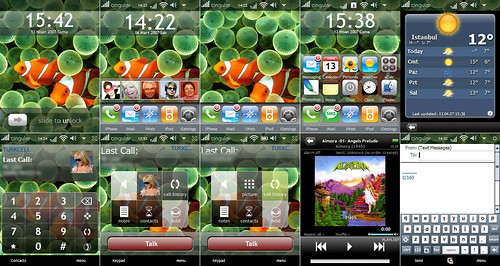
basically with this app you replace you today/home screen giving it a whole new interface if you wish. you can do pretty much whatever you want with it from just putting shortcuts to the apps and games you want - making a whole new user interface with multiple pages, buttons, shortcuts, weather updates... pretty much anything.. here is some examples of some interfaces made by other users (some of these may or may not be compatible wit the omnia im just using them as examples of what you can do)


all of those people made and if you search the internets you can find some good ones to download... and yes i said download.. you can download themes already made by other people (you can even modify them too)

with mine i have the 5th interface link. now that one was in french so some of the buttons didnt work cause they were in french but i liked the interface alot. so i just went in to "author mode" and did some editing on it. its very easy to use once you do some pokin around and the site forum is very helpful

with mine i made all the buttons work and even switched some of them around. like at the bottom right left hand side you see a sun with a thermometer, it takes you to the weather page that shows you the highs and lows for the day and the rest of the week.

well i changed that button to so instead of the sun all the time, it will show what its like outside (sunny, raining, snowing, night, cloudy) and just under the button i have it show what "it feels like" outside. now when you click on it, it still goes to the weather section showing you the weathers high and low for the week but i added a row on it. that row show the current temperature and the humidity.

i did some other changes but those dont really matter. just know you can do alot with this app and be happy. the app works in both portrait and landscape and allows you to have totally separate interfaces for them if you prefer it that way. it also works with alot of the today screen plugins such as pocket player's and many other programs.

this is a must have app for any omnia user

-=-=-=-=-

Last for today: Skyfire web browser

now the omnia comes with opera built in which is a good browser but alot of flash stuff dowsnt work even with the up to date flashlite installed. but with skyfire you cando EVERYTHING from youtube to games. it is exactly like a web browser on your computer. now for some phones its got some bugs but for the omnia it works perfect. i wasnt even using a wifi connection i was just using the mobile broadband. i will leave you with this video to watch so you can see it in action.


-=-=-=-=

now the first 2 apps are "pay to have" but the skyfire browser is completely free... but as for any app, poke around and who knows what you might find free

if there is any apps you would like me to look in to please leave me a comment and i will see if its worth takin a look at